


Indoor thermometer
4.6245.00 Reviews
App Specs
- Version
- 3.0.13
- Updated On
- License
- Free
- Downloads
- 1,000,000+
- Developer
- Sweetvrn
- Categories
- Weather
- Platform
- Android, iOS
Screenshots
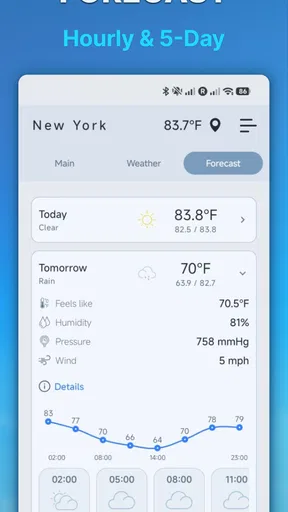
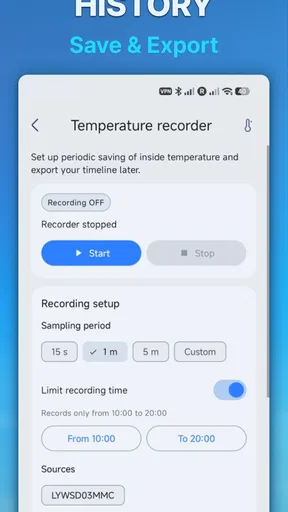
 Analysis by AppCompare
I find a phone-based thermometer most useful when I need a quick sense of the room, not a laboratory reading. That distinction matters with Indoor Thermometer: it is a free weather app from Sweetvrn, and its appeal is the convenience of checking indoor and outdoor temperature on a device I already carry. Before relying on it, I’d decide whether a simple at-a-glance check is enough or whether I need a dedicated instrument that measures conditions independently of a phone.
What I would want from an indoor temperature check
For everyday comfort, I usually want to answer a practical question: does this room feel unusually warm or cool, and should I adjust what I’m doing? That might mean opening a window, changing the heating, or moving a plant away from a chilly spot. A phone app can make that check convenient, but convenience and measurement certainty are not the same thing. I would treat a reading as a useful indication rather than the final word when a precise temperature matters.
That is the lens I’d use with Indoor Thermometer. Its straightforward purpose makes it easy to understand, and its store summary focuses on showing indoor and outdoor temperature. I wouldn’t choose it expecting a full home-monitoring system or a substitute for specialist equipment. I’d choose it when I want an uncomplicated temperature check without first buying or placing another device.
Where this app makes the most sense
The strongest reason to try it is that it lowers the effort involved in checking conditions around you. If I’m already holding my phone, opening an app is simpler than looking for a separate thermometer. That can be handy when I’m working at home and wondering why one room feels stuffy, or when I want a quick check before deciding whether to bring a jacket outside.
A realistic routine would be to check the room before settling down to work, then compare the result with how the space feels after a window has been open for a while. I would use that as a prompt to notice a change, not as proof that the entire room has reached a particular temperature. Rooms can vary from one corner to another, and a phone’s position can influence what it senses. Keeping the phone away from direct sunlight, a heater, or a recently used hand is a sensible way to avoid misleading impressions.
What to compare it with before deciding
The alternatives fall into different groups. A basic standalone thermometer is better when I want a dedicated reading from a fixed place in the room. A connected home sensor may suit someone who wants ongoing monitoring as part of a broader smart-home setup. A general weather app is the more natural choice if the main question is the forecast rather than the temperature where I’m sitting. Indoor Thermometer occupies the convenient middle ground: a quick check on a phone, without making a larger setup the point of the experience.
That middle ground is useful, but it comes with a trade-off. A phone is not positioned in the room like a wall-mounted or tabletop thermometer, and not every device is equally suited to sensing ambient conditions. I would avoid making decisions about delicate storage, equipment, or a health-sensitive environment from a casual phone reading alone. In those cases, a purpose-built thermometer placed where the conditions matter is the safer choice.
Worth Reading Before You Choose

EA SPORTS FC Mobile 26 Is a Bigger Football Game, but It Takes Time

Flipboard Shows What News Apps Must Do Beyond the Feed

Switching to Android Auto Means Rethinking Your Driving Routine

Google Calendar Makes a Crowded Week Easier to Manage

Ludo King Makes the Most of the Minutes Between Plans

Baby Panda World Brings Quick Play to Modern Phones, but Its Game Library Feels Busy
Small habits that make a reading more useful
I’d make comparisons under similar conditions rather than checking once in one place and later in another. Put the phone down for a little while, keep it out of direct heat or sunlight, and check from the same part of the room if you want to notice a rough trend. This does not turn a phone into professional equipment, but it makes a casual comparison less vulnerable to obvious sources of variation.
Another useful habit is to connect a number to a decision. If a room feels uncomfortable, note whether the reading changes after you adjust ventilation or move to another part of the space. The app is most helpful when it supports that kind of practical observation; it is less helpful if I expect one number to explain every difference in comfort. Humidity, airflow, sunlight, clothing, and activity can all affect how a room feels, so temperature alone is only part of the picture.
Who should choose another kind of tool
I’d skip a phone thermometer as my main instrument if I needed dependable, repeatable measurements for a specific task. A dedicated thermometer makes more sense for checking a nursery or storage area over time, while a specialist monitor is preferable when air conditions need closer attention. Likewise, if I mostly want rain timing, wind, or a forecast for a trip, I’d reach for a conventional weather service rather than expect an indoor-focused tool to answer those questions.
It is also worth considering how often you will use it. If you only check room temperature a few times a year, a physical thermometer may be simpler to keep in a known spot. If you want a quick reading wherever your phone happens to be, the app has a clearer advantage. I would decide based on the task, not on the assumption that having more readings automatically means better monitoring.
What trying it costs, and what switching involves
There is no purchase price to weigh up: the app is free, and its content rating is Everyone. That makes trying it a low-commitment way to see whether phone-based temperature checks fit your routine. The more meaningful cost is attention: remembering that a quick mobile reading is an estimate of the conditions around the device, not a carefully placed room sensor.
If you later switch to a standalone thermometer, the change is simple in practical terms: place the instrument where you care about the temperature and use that spot consistently. If you move to a connected sensor, you are choosing a broader monitoring approach rather than just replacing one display with another. I would not switch merely because I want a more impressive interface; I would switch because I need a stable location, more confidence, or a particular kind of monitoring.
How I’d judge it after a week
For a fair trial, I’d use it in the same room at a few different times and see whether the readings help explain comfort changes. I would avoid comparing a phone held near a sunny window with a thermometer sitting in a shaded corner and then blaming the app for the difference. A consistent routine gives a more useful sense of whether the app is convenient enough for my needs.
I’d also ask myself whether I need indoor checks, outdoor checks, or both. The app is presented as covering indoor and outdoor temperature, which makes it more flexible than a tool intended only to sit in one room. Still, if my outdoor decisions depend on detailed forecasts or changing conditions, I would pair it with a weather service designed for that job instead of treating a temperature reading as a forecast.
First Impressions and Features
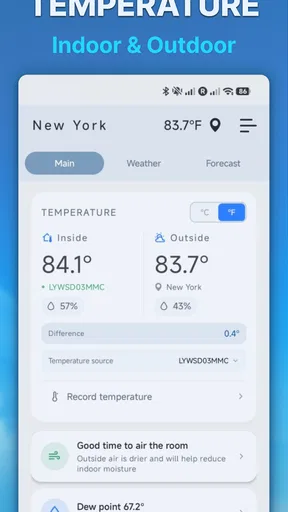
From the get-go, the Indoor Thermometer app greets you with a sleek, intuitive interface. It's designed to be user-friendly, so even if you're not a tech wizard, you'll navigate it with ease. The app's core function is simple: it provides real-time indoor temperature readings using your device’s sensors. But wait, there’s more!
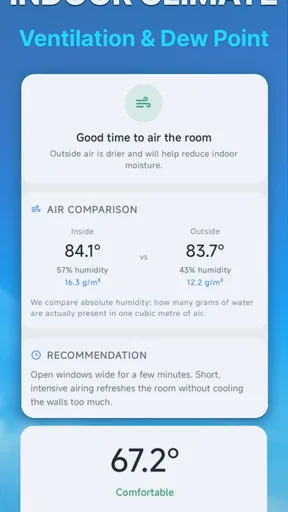
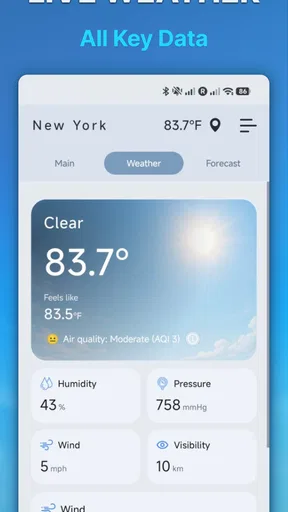
You’ll find additional features like humidity readings and air quality indicators, which are neat bonuses. These extras make it more than just a thermometer app; it’s a full-on environmental monitor for your home. You can set alerts to notify you when certain temperature or humidity thresholds are met, which is super handy for maintaining a comfortable living space.
Setting Up and Usability
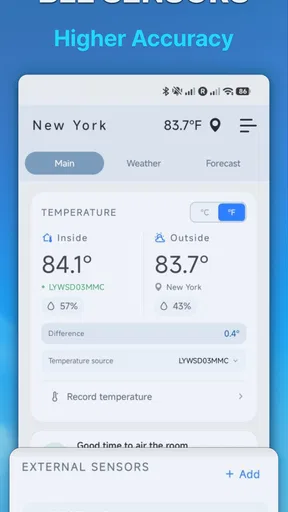
Setting up the app is a breeze. After a quick download from the app store, you’re ready to roll. The app doesn’t require any fancy equipment or external sensors—just your smartphone. How convenient is that?
Once you open the app, it automatically calibrates using your phone’s built-in sensors. It’s pretty fascinating to see how well your phone can monitor the indoor climate. The readings appear almost instantly, and you can toggle between different units of measurement, like Celsius or Fahrenheit, with just a tap.
Accuracy and Performance
Now, let's talk accuracy. The app holds its own when it comes to delivering precise temperature readings. While it might not replace professional-grade equipment, for daily use, it’s remarkably accurate. I compared its readings with a standalone digital thermometer, and the results were consistently close.
The app’s performance is smooth, with no noticeable lag or crashes. It’s lightweight, so it doesn’t hog your phone’s resources, which is always a plus. Even with multiple features running, the battery drain is minimal.
Design and User Experience
Design-wise, the app is a winner. It boasts a modern, clean look with easy-to-read fonts and graphics. Navigating through the different features is straightforward, thanks to thoughtful layout choices. The developers clearly prioritized user experience, making sure everything is accessible with just a few taps.
The app also allows some customization options, like changing the theme color and adjusting the layout to suit your preferences. It’s these small touches that enhance the overall user experience, making the app feel personalized to your needs.
Final Thoughts
So, is the app worth a spot on your phone? Absolutely, especially if you’re someone who values comfort and wants to keep a close eye on your home’s environment. It’s packed with useful features, easy to use, and delivers reliable readings—all without the need for extra gadgets.
Whether you're a tech enthusiast or just a regular person wanting to keep your indoor climate in check, this app is a solid choice. It’s like having a little weather station in your pocket, always ready to give you the lowdown on your indoor environment. So, why not give it a shot? Your cozy home awaits!
Who is likely to get the most from it?
I’d recommend it to someone who wants a quick temperature reference and is comfortable treating a phone reading as a guide. It suits renters who cannot install hardware, people who move between rooms, and anyone curious about whether a room feels different after changing ventilation. The app has an average rating of 4.6 from around 25 thousand ratings, and more than a million installs, so plenty of people have tried this kind of simple, phone-first approach.
Sweetvrn’s app was released in July 2021, and its current version is 3.0.10. It runs on Android 6.0 or later. Those details are useful if you are checking compatibility with an older device; for iPhone users, I would check the relevant app store before planning to install it, rather than assume an Android minimum applies across platforms.
My recommendation
My overall advice is to try it if your goal is a convenient everyday check, then keep a dedicated thermometer in mind if a stable or more consequential measurement matters. The app’s weather category and uncomplicated purpose make the decision easy: it is a handy companion, not a replacement for every kind of temperature instrument. It is best for curiosity and comfort decisions, and a weaker fit for precise monitoring or detailed outdoor forecasts.
There are 221 written reviews alongside the broader rating, but I would still judge it by how well it serves your own routine. If a quick glance on your phone helps you notice when a room feels different, that convenience may be all you need. If you find yourself questioning every reading or needing to track one location consistently, moving to a purpose-built device is the sensible next step.
Pros
- Accurate temperature readings.
- User-friendly interface.
- Quick setup process.
- Low battery consumption.
- Customizable alerts.
Cons
- Limited features in free version.
- Requires location access.
- Ads can be intrusive.
- Occasional connectivity issues.
- No widget support.
FAQs for Indoor thermometer
What is the primary function of the Indoor Thermometer app?
The Indoor Thermometer app is designed to provide accurate temperature readings of your indoor environment. Utilizing your device’s built-in sensors, it offers real-time data, allowing you to monitor and adjust your surroundings for optimal comfort. It's especially useful for managing heating or cooling systems efficiently.
How accurate are the temperature readings on the Indoor Thermometer app?
The accuracy of the Indoor Thermometer app depends on the quality of your device's sensors. Generally, it provides reliable readings, though external factors like device placement and airflow can affect accuracy. For best results, ensure your device is in a stable location away from heat sources.
Does the Indoor Thermometer app require an internet connection to function?
No, the Indoor Thermometer app does not require an internet connection for basic temperature readings. It relies on your device’s internal sensors. However, some features, like data logging or sharing results, may require internet access to function fully.
Is the Indoor Thermometer app compatible with all smartphones?
The Indoor Thermometer app is compatible with most Android and iOS devices featuring the necessary sensors. However, older models or those without specific hardware capabilities may not support all features. It’s recommended to check the app’s compatibility with your device before downloading.
Are there any additional features included in the Indoor Thermometer app?
Yes, the app often includes additional features such as humidity readings, historical data logging, and customizable alerts for specific temperature ranges. These features enhance user experience, providing comprehensive environmental monitoring to maintain the perfect indoor climate.


